
Prerequisites
CRE Connect is a permissioned service. Before you can use the SDK or call the API, your organization must exist on the Chainlink Platform and be provisioned by Chainlink Labs for CRE Connect. Steps 1–3 cover the account and API key; steps 4–6 cover the local toolchain and integration choices.
1. Create your organization
Go to app.chain.link and create an account or sign in.
Once signed in, navigate to your account icon on the top-right corner, then click "Org settings" in the dropdown to open the Organization page.
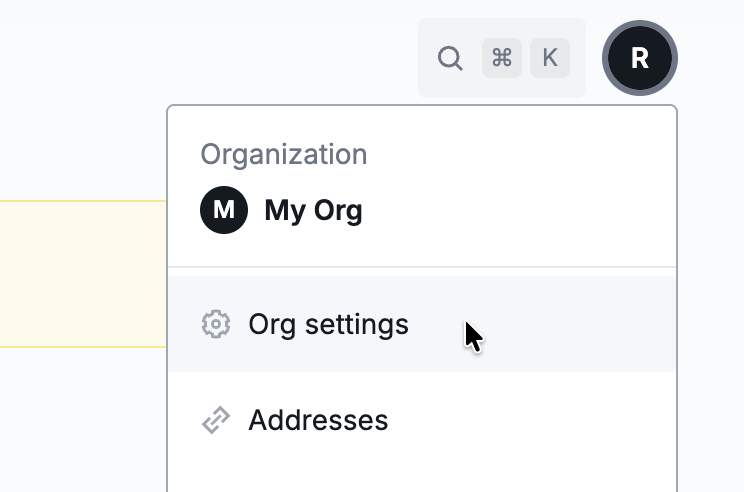
The account dropdown with the Org settings option.
Your Organization ID is displayed in the page header — copy it.
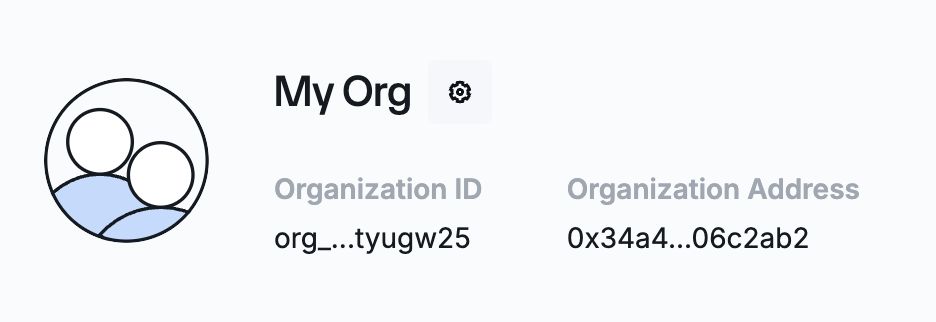
The Organization page showing your Organization ID in the header.
2. Share your Organization ID
Share your Organization ID with your Chainlink Labs contact so they can enable CRE Connect for your organization. You cannot create API keys or use CRE Connect until this step is complete.
3. Create an API key
Once your account has been provisioned, create an API key.
-
Log in to the Chainlink Platform, click on "Org settings" in the top-right corner of the navbar to open your Organization Settings page, then open the API Keys tab.
-
Click Create API Key and enter a name for the key.
-
In the API Scope section, expand the CRE Connect accordion and grant the key the permissions that this Getting Started guide uses.
Permission Setting Permission IDs Network Read crec:network:readChannel All crec:channel:read,crec:channel:writeChannel archive All crec:channel:archive:writeWatcher All crec:watcher:read,crec:watcher:writeWatcher archive All crec:watcher:archive:writeEvent Read crec:event:readWallet All crec:wallet:read,crec:wallet:writeWallet archive All crec:wallet:archive:writeOperation All crec:operation:read,crec:operation:writeOperation signature All crec:operation:signature:writeQuery All crec:query:read,crec:query:writeSee API Keys for the full list of permissions available for CRE Connect.
-
Click Create API Key, then copy the key and click Done. The API key is displayed only once.
You will use this key in the Authorization header for all CRE Connect REST calls and as the apiKey argument to the Go SDK constructor:
curl https://cre-connect.api.chain.link/v1/<endpoint> \
  -H "Authorization: Apikey <API_KEY>"
client, err := crec.NewClient(
    "https://cre-connect.api.chain.link/v1",
    "<API_KEY>",
    crec.WithOrgID("<your-org-id>"),
)
For local development, store the key, the base URL, and your Organization ID in environment variables so they never land in source control:
export CREC_BASE_URL="https://cre-connect.api.chain.link/v1"
export CREC_API_KEY="<your-api-key>"
export CREC_ORG_ID="<your-org-id>"   # the Organization ID from step 1, e.g. org_example00000000000
4. Go toolchain
The CRE Connect SDK targets Go 1.25.3 or higher, and the DTA extension targets Go 1.25.5 or higher. Use Go 1.25.5+ to cover both. Check your version:
go version
If your installed Go is older, you have two options:
-
Upgrade your toolchain: follow the official install instructions at go.dev/dl.
-
Let Go fetch the right toolchain on demand:
GOTOOLCHAIN=autois the default since Go 1.21, so as long as yourgo.moddeclaresgo 1.25.5(or higher) and atoolchaindirective, Go will download the matching toolchain transparently the first time you rungo build,go run, orgo mod tidy. For a fresh project:go mod init <your-module> go mod edit -go=1.25.5 -toolchain=go1.25.9
5. A supported network and chain selector
Watchers and wallets are pinned to a network. CRE Connect identifies networks by their chain selector (a uint64 represented as a string in API payloads, for example 5009297550715157269 for Ethereum Mainnet).
You can list supported networks at runtime once authenticated (see Authentication) or consult the static Supported Networks reference.
The quickstarts in this section target Sepolia (16015286601757825753).
6. A signer
Operations are signed off-chain before being submitted to CRE Connect. You will need a key (or a key-management service) to produce ECDSA signatures.
The fastest option for the quickstarts is the local ECDSA signer in crec-sdk/transact/signer/local, which loads a *ecdsa.PrivateKey directly into memory:
import (
    "github.com/ethereum/go-ethereum/crypto"
    "github.com/smartcontractkit/crec-sdk/transact/signer/local"
)

pk, _ := crypto.HexToECDSA("ab12...")
signer := local.NewSigner(pk)
The SDK ships first-class adapters for managed signers:
- AWS KMS:
crec-sdk/transact/signer/kms - HashiCorp Vault:
crec-sdk/transact/signer/vault - Fireblocks:
crec-sdk/transact/signer/fireblocks - Privy:
crec-sdk/transact/signer/privy
You can also implement your own by satisfying the signer.Signer interface; see Implement a Custom Signer.
Checklist
- Organization created on app.chain.link; Organization ID copied.
- Organization ID shared with Chainlink Labs and CRE Connect enablement confirmed.
- API key generated in your org's Organization → API Keys tab, stored securely, and exposed via env var.
CREC_BASE_URL,CREC_API_KEY, andCREC_ORG_IDexported in your shell.go versionreports 1.25.5 or higher (or yourgo.modhasgo 1.25.5+ atoolchaindirective).- You have picked a supported network and know its chain selector.
- You have a signer (local key for the quickstarts; managed signer for production).
When all of these are checked, continue to SDK Installation.
Related
- SDK Installation: install the modules you'll use in the next step.
- Authentication: initialize the client with the API key you just created.
- Supported Networks: pick a chain and grab its chain selector.